Mast-in
mast-in-cluster.cemef.mines-paristech.fr
Specifications
Hardware
Mast-in is a small cluster consisting of:
- 1 login node
- 16 compute nodes
| Node | Model | CPU | RAM | GPU |
|---|---|---|---|---|
| mast-in | BullX R423-E3 | 2 x Intel(R) Xeon(R) CPU E5-2640 0 @ 2.50GHz (hexacore) | 64GB | None |
| in-[1-16] | BullX R424-E3 | 2 x Intel(R) Xeon(R) CPU E5-2640 0 @ 2.50GHz (hexacore) | 32GB | None |
mast-in$ lscpu
Architecture:        x86_64
CPU op-mode(s):      32-bit, 64-bit
Byte Order:          Little Endian
CPU(s):              12
On-line CPU(s) list: 0-11
Thread(s) per core:  1
Core(s) per socket:  6
Socket(s):           2
NUMA node(s):        2
Vendor ID:           GenuineIntel
CPU family:          6
Model:               45
Model name:          Intel(R) Xeon(R) CPU E5-2640 0 @ 2.50GHz
Stepping:            7
CPU MHz:             1199.995
CPU max MHz:         3000.0000
CPU min MHz:         1200.0000
BogoMIPS:            4999.96
Virtualization:      VT-x
L1d cache:           32K
L1i cache:           32K
L2 cache:            256K
L3 cache:            15360K
NUMA node0 CPU(s):   0-5
NUMA node1 CPU(s):   6-11
Flags:               fpu vme de pse tsc msr pae mce cx8 apic sep mtrr pge mca cmov pat pse36 clflush dts acpi mmx fxsr sse sse2 ss ht tm pbe syscall nx pdpe1gb rdtscp lm constant_tsc arch_perfmon pebs bts rep_good nopl xtopology nonstop_tsc cpuid aperfmperf pni pclmulqdq dtes64 monitor ds_cpl vmx smx est tm2 ssse3 cx16 xtpr pdcm pcid dca sse4_1 sse4_2 x2apic popcnt tsc_deadline_timer aes xsave avx lahf_lm epb pti ssbd ibrs ibpb stibp tpr_shadow vnmi flexpriority ept vpid xsaveopt dtherm ida arat pln pts md_clear flush_l1d
Disk storage available to users is provided by a 1.2TB RAID-6 XFS volume on mounted at /scratch.
The machines are actually based on Supermicro motherboards X9DRH-7TF/7F/iTF/iF (R423) and X9DRT-HIBQF (R424).
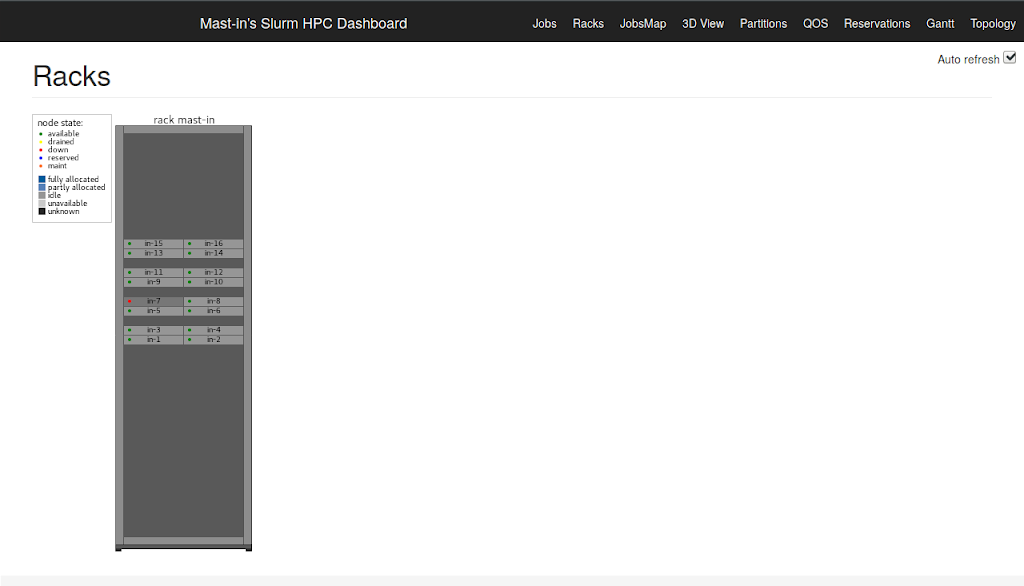
Node in-7 is currently inactive due to an issue with the motherboard.
Operating System
The cluster was originally installed with CentOS 6.3 but given the buggy support of Mellanox card in 6.10 and other issues related to upgrading to newer versions, it was reinstalled entirely on 10/01/2020.
Ubuntu 18.04.3 LTS Bionic Beaver x86_64
mast-in$ uname -a
Linux mast-in 4.15.0-74-generic #84-Ubuntu SMP
Thu Dec 19 08:06:28 UTC 2019 x86_64 x86_64 x86_64 GNU/Linux
Hardware documentation
- Supermicro motherboard
- Mellanox Infiniband MT26428
- Mellanox Infiniband MT27500
- Benchmark with ConnectX-3 adapters
Configuration
Users
The LDAP server at CEMEF is used for managing user accounts and only one local administrative account was created.
Users should be activated manually by a user with administrative rights.
Network
Only the login node is visible on the CEMEF network at mast-in-cluster.cemef.mines-paristech.fr.
The address is configured statically:
mast-in$ ifconfig enp5s0f0
enp5s0f0: flags=4163<UP,BROADCAST,RUNNING,MULTICAST>  mtu 1500
        inet 10.202.96.2  netmask 255.255.240.0  broadcast 10.202.111.255
        inet6 fe80::225:90ff:fe92:a070  prefixlen 64  scopeid 0x20<link>
        ether 00:25:90:92:a0:70  txqueuelen 1000  (Ethernet)
        RX packets 37038726  bytes 4570883977 (4.5 GB)
        RX errors 0  dropped 52378  overruns 0  frame 0
        TX packets 69596327  bytes 99385961398 (99.3 GB)
        TX errors 0  dropped 0 overruns 0  carrier 0  collisions 0
        device memory 0xdfa20000-dfa3ffff
Two networks are available between the login node and the compute nodes:
- an Ethernet 1Gb network for administration (172.20.128.0)
- an Infiniband network for compute jobs (172.20.144.0)
For both network IP addresses are numbered from 200: mast-in is at 200 then in-[1-16].
On the administrative network mast-in is configured to act as DHCP server (configuration in /etc/dhcp/dhcpd.conf).
mast-in$ ifconfig enp5s0f1
enp5s0f1: flags=4163<UP,BROADCAST,RUNNING,MULTICAST>  mtu 1500
        inet 172.20.128.200  netmask 255.255.255.0  broadcast 172.20.128.255
        inet6 fe80::225:90ff:fe92:a071  prefixlen 64  scopeid 0x20<link>
        ether 00:25:90:92:a0:71  txqueuelen 1000  (Ethernet)
        RX packets 731336  bytes 77388090 (77.3 MB)
        RX errors 0  dropped 0  overruns 0  frame 0
        TX packets 1473408  bytes 1902221887 (1.9 GB)
        TX errors 0  dropped 0 overruns 0  carrier 0  collisions 0
        device memory 0xdfa00000-dfa1ffff
        ifconfig ib0
On the compute network addressed are setup statically (there are some bugs in the netplan configuration utility though...).
mast-in$ ifconfig ib0
ib0: flags=4163<UP,BROADCAST,RUNNING,MULTICAST>  mtu 65520
        inet 172.20.144.200  netmask 255.255.0.0  broadcast 172.20.255.255
        inet6 fe80::202:c903:28:26e3  prefixlen 64  scopeid 0x20<link>
        unspec A0-00-02-20-FE-80-00-00-00-00-00-00-00-00-00-00  txqueuelen 256  (UNSPEC)
        RX packets 5990593  bytes 294996033834 (294.9 GB)
        RX errors 0  dropped 0  overruns 0  frame 0
        TX packets 5021923  bytes 158130670436 (158.1 GB)
        TX errors 0  dropped 0 overruns 0  carrier 0  collisions 0
The storage volume under /scratch is exported over Infinband network using NFSv4 (configuration in /etc/exports) with IP over Infiniband: the faster NFS over RDMA option does not seem supported anymore.
The Infiniband (IB) adapters are installed and managed using the Mellanox OFED tools.
Some notes:
- The OpenIB utility is used for loading and configuring the adapter (startup script
/etc/init.d/openibd). - The utility OpenSM should run on
mast-into manage the network (startup script/etc/init.d/opensmd). - Originally the IB network was configured to use communication mode "datagram" which is supposed to scale better but the bandwidth performance with
iperfwas only 5 Gb/s. I moved to use the "connected" mode with a MTU 65520 so that the IPoIB performance is over 20Gb/s (max 28Gb/s): that may help for NFS writes.
References:
- Mellanox IPoIB documentation
- Arch Linux Infiniband Wiki page
- Ubuntu NFS HowTo
- Netplan configuration FAQ
Check Infiniband adapter status:
mast-in$ ibstat
CA 'mlx4_0'
        CA type: MT26428
        Number of ports: 1
        Firmware version: 2.9.1000
        Hardware version: b0
        Node GUID: 0x0002c903002826e2
        System image GUID: 0x0002c903002826e5
        Port 1:
                State: Active
                Physical state: LinkUp
                Rate: 40
                Base lid: 1
                LMC: 0
                SM lid: 1
                Capability mask: 0x0251086a
                Port GUID: 0x0002c903002826e3
                Link layer: InfiniBand
List nodes (only administrator):
mast-in$ sudo ibnodes
Ca      : 0x002590ffff17c654 ports 1 "in-16 HCA-1"
Ca      : 0x002590ffff17cb88 ports 1 "in-15 HCA-1"
Ca      : 0x002590ffff17cc48 ports 1 "in-12 HCA-1"
Ca      : 0x002590ffff17c67c ports 1 "in-14 HCA-1"
Ca      : 0x002590ffff17caec ports 1 "in-11 HCA-1"
Ca      : 0x002590ffff17cc80 ports 1 "in-13 HCA-1"
Ca      : 0x002590ffff17cc7c ports 1 "in-10 HCA-1"
Ca      : 0x002590ffff17cc70 ports 1 "in-9 HCA-1"
Ca      : 0x002590ffff1716dc ports 1 "in-8 HCA-1"
Ca      : 0x002590ffff17143c ports 1 "in-2 HCA-1"
Ca      : 0x002590ffff1716d4 ports 1 "in-6 HCA-1"
Ca      : 0x002590ffff1711e4 ports 1 "in-3 HCA-1"
Ca      : 0x002590ffff1717b4 ports 1 "in-4 HCA-1"
Ca      : 0x002590ffff1716f0 ports 1 "in-5 HCA-1"
Ca      : 0x002590ffff17130c ports 1 "in-1 HCA-1"
Ca      : 0x0002c903002826e2 ports 1 "mast-in HCA-1"
Switch  : 0x0002c9020046f758 ports 18 "Infiniscale-IV Mellanox Technologies" base port 0 lid 2 lmc 0
Job Scheduler
Computational jobs are managed using Slurm.
References:
For now only two queues are available:
testingopen to everyone but with a limit of 2 nodes per allocation and a 1hour walltime.mainonly for EXALIB developers with a walltime of 24hours.
Show partitions:
mast-in$ sinfo
PARTITION AVAIL  TIMELIMIT  NODES  STATE NODELIST
main         up 1-00:00:00     15   idle in-[1-6,8-16]
testing*     up    1:00:00     15   idle in-[1-6,8-16]
Show current jobs:
mast-in$ squeue
             JOBID PARTITION     NAME     USER ST       TIME  NODES NODELIST(REASON)
                13   testing    sleep alarcher  R       0:03      1 in-1
Show accounting information:
mast-in$ sacct
       JobID    JobName  Partition    Account  AllocCPUS      State ExitCode
------------ ---------- ---------- ---------- ---------- ---------- --------
12                sleep    testing                     2    RUNNING      0:0
Administration
User management
User accounts are fetched from the LDAP server, the configuration for the LDAP client can be found in /etc/ldap.conf.
PAM configuration files in /etc/pam.d as well as /etc/nsswitch.conf were modified accordingly.
Currently passwords are all considered as expired for some yet undetermined reason so PAM support in SSH was deactivated: only authentication with SSH keys is supported for now.
The administrator should trigger creation of the home directory using sudo su - username and add the public SSH key in the .ssh/authorized_keys file of the user.
Information about the user account can be queried from the LDAP server by the administrator using getent.
Example:
mast-in$ getent passwd aurelien.larcher
aurelien.larcher:x:1728:1054:Aurelien LARCHER:/gcfl/aurelien.larcher:/bin/bash
References:
Software installation
Environment-modules are used for managing software installations:
/scratch/optis the prefix of installed binaries./scratch/modulesis the root of modulefiles.
List available modules:
mast-in$ module avail
------------------------ /usr/share/modules/modulefiles ------------------------
dot  module-git  module-info  modules  null  use.own

------------------------- /scratch/modules/modulefiles -------------------------
cimlibxx/master  mtc/master
Load module:
mast-in$ module load cimlibxx
mast-in$ which cimlib_CFD_driver
/scratch/opt/cimlibxx/master/bin/cimlib_CFD_driver
List loaded modules:
mast-in$ module list
Currently Loaded Modulefiles:
 1) mtc/master   2) cimlibxx/master